
Online Safety · Gmail App on iPhone
Manage Unwanted Gmail on iPhone
Choose one task. Read one step at a time.
PDF · 5 pages · Large print · 151 KB
Choose the task you need
Start in the Gmail app on your iPhone. These are separate choices. You do not need to do all three to one message.
- Report spam for suspicious messages or junk mail.
- Block a sender for repeat unwanted messages.
- Unsubscribe safely only from newsletters you recognize and trust.
These simplified illustrations use fictional email details. Gmail layouts and prompts may vary. Never tap links inside a suspicious email.
Report spam in Gmail
A separate task — three steps.
1. Open an unwanted email.
Tap the message in your Inbox. Do not tap links inside it.
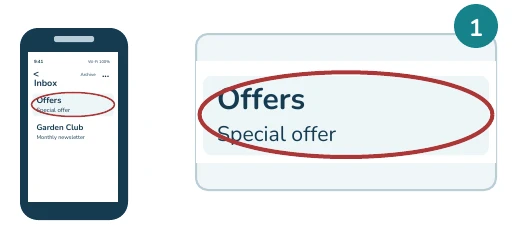
Next: Use the top three-dot menu.
2. Tap the TOP three dots.
Use the menu at the very top. Not the dots beside the sender.
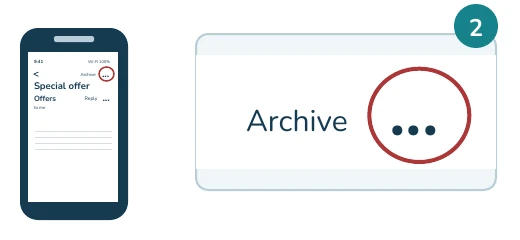
Next: Choose Report spam.
3. Tap Report spam.
This moves the email to Spam. Google receives a copy to review.
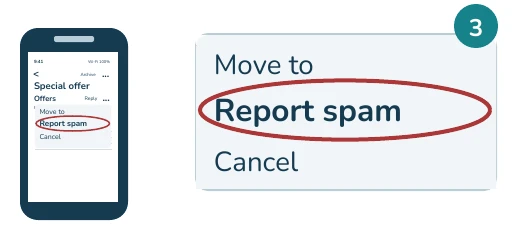
Result: The message leaves your Inbox.
Block a sender in Gmail
A separate task — three steps.
1. Open the sender's email.
Choose a repeat unwanted sender. Example sender: Offers.
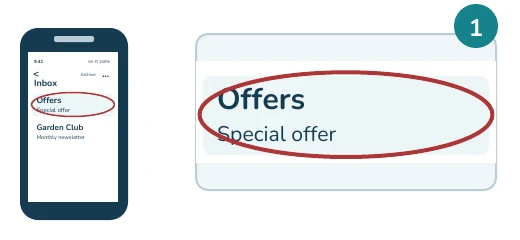
Next: Find the dots beside Reply.
2. Tap the SENDER'S dots.
Use the dots beside Reply. These are below the top menu.
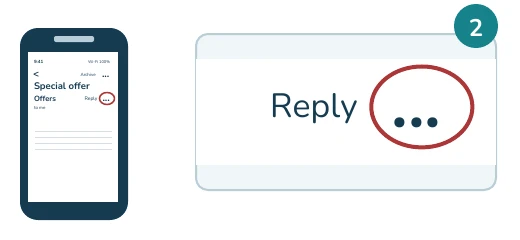
Next: Choose Block with the sender name.
3. Tap Block "Offers".
Your screen shows that sender's name instead of "Offers".
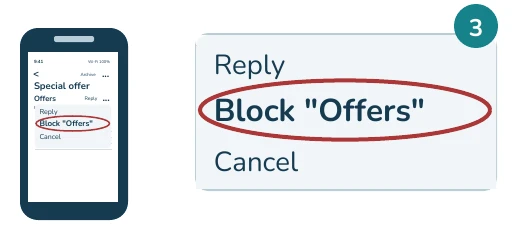
Result: Future mail from them goes to Spam.
Unsubscribe safely in Gmail
A separate task — three steps.
1. Open a trusted newsletter.
Use a mailing list you know. Suspicious message? Report spam.
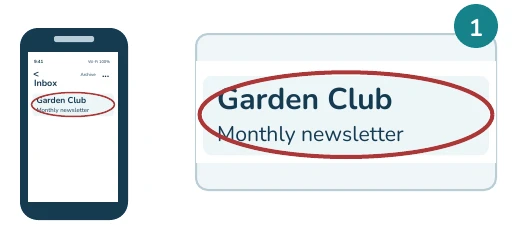
Next: Find Gmail's Unsubscribe option.
2. Tap Gmail's Unsubscribe.
Look beside the sender's name. Avoid links in suspicious emails.
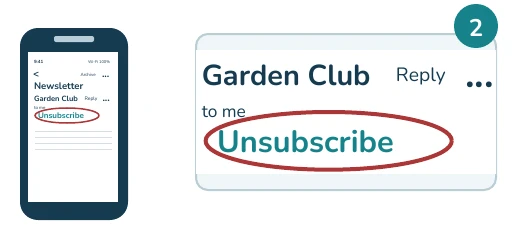
No option, or Go to website? Ask for help.
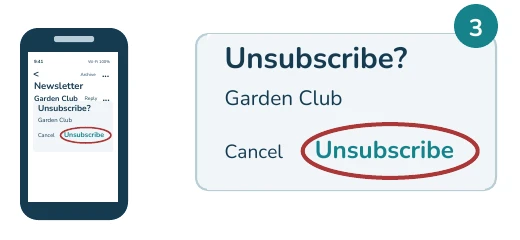
3. Confirm Unsubscribe.
If this pop-up appears, tap Unsubscribe to confirm.
Result: It may take a few days to stop.
If you need help
An option is missing?
Your Gmail version may look different. If Unsubscribe is missing, Go to website appears, or a prompt is unfamiliar, pause and ask for help before continuing.
Newsletter mail still arriving?
Allow a few days after unsubscribing. You may still receive other mail from that sender. Blocking cannot stop every new sender address.
Made a mistake?
In Spam, open the message and use the top menu to choose Report not spam. To unblock a sender, open their email and use the sender’s menu beside Reply. Call (301) 300-1716 if you need help.
Sources
- Google Gmail Help: Report spam
- Google Gmail Help: Block an email address
- Google Gmail Help: Unsubscribe
Reviewed October 19, 2026.